Choose your implementation approach
Both the SDK and REST API let you build the lab experience how you want. The SDK handles much of the API code for you. With the REST API, you write and control that code yourself.
Hosted Lab Pages: use a ready-made lab interface
Your platform creates a signed launch link and sends the learner to a Cybr-hosted lab page. This option requires minimal engineering. Cybr provides and maintains the lab page, including:- Lab controls and abuse prevention: Launch and end controls, access limits, and lab status.
- Environment access: Connection details and optional web terminal access.
- Learning content: Lab guides, diagrams, and Q&A.
- Progress and verification: Completion tracking and CTF flag verification.
- Learner engagement: Comments, discussions, and thumbs-up or thumbs-down feedback.
- Custom branding: Branding options for your organization.
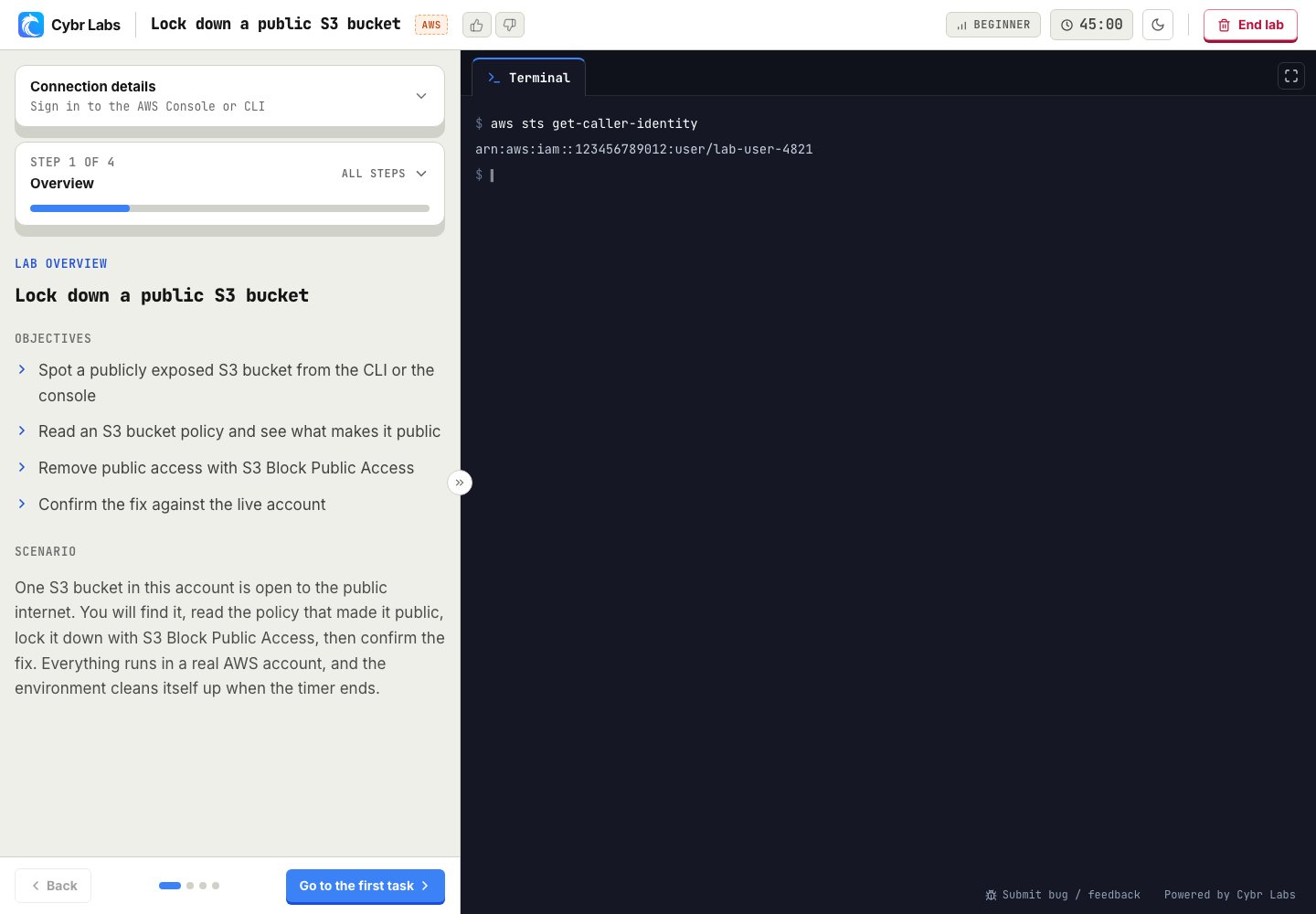
A Hosted Lab Page with sample data. Custom branding is available, with built-in Q&A, comments and discussions, diagrams, and optional web terminal access.
SDK or REST API: make labs part of your own product
With the SDK or REST API, learners access labs directly inside your website, course, or application. You decide how the lab experience looks and fits into their learning journey. We manage the same lab lifecycle whichever approach you choose. Your application can access lab guides, connection details, CTF verification, and completion records through the SDK or API. Compared with Hosted Lab Pages, you get more control and take on more engineering work:- Your own experience: Design the layout, navigation, and interactions around your product, beyond the branding options of Hosted Lab Pages.
- Your own learning flow: Put a lab alongside a lesson, use completion to unlock content, or connect results to your progress tracking.
- Your choice of features: Show the guides, discussions, and other available lab features that fit your platform. You build the interface for each feature you include.
- More to build and maintain: Your team develops, tests, and maintains the lab interface and integration. Cybr continues to manage the lab environments.
SDK: less API code for JavaScript and TypeScript
The public SDK package is coming soon. We will add installation details to the SDK quickstart when it is available. For JavaScript and TypeScript applications, our SDK gives you methods to launch labs, check their status, and track completion. It handles requests, retries, and waiting for labs to become ready, so you can focus on the experience inside your platform. If you want web terminal access, the terminal helper manages the connection. Your application supplies the terminal view. Start with the SDK quickstart.REST API: direct HTTP requests from your chosen language
The REST API gives you direct access to the same lab capabilities from your preferred language. It fits applications outside JavaScript and TypeScript, or teams that want to manage their own API integration. You control how your application sends requests, handles errors, and waits for labs to become ready. That flexibility comes with more code to write and maintain. You can also combine direct REST requests with the SDK. Start with the REST API guide and its OpenAPI specification.Example of launching a lab with the SDK and with the API
These examples request the same deployment. Both run on a server and use the same organization API key.apiKey represents a key from secure server configuration. It is not a browser value.
- SDK
- REST API
deployment.waitUntilReady() for that wait. A direct REST integration polls the deployment status endpoint.
Start with your chosen option
Hosted Lab Pages
Connect your platform to a Cybr-provided lab interface.
SDK quickstart
Build your interface with JavaScript or TypeScript.
REST API
Build your interface with direct HTTP requests.